
Creating a well-organized home workspace can make a significant difference in your productivity and comfort throughout the day. Whether you work remotely full-time or occasionally need to focus on personal projects, a clutter-free and functional area helps you stay motivated and efficient. In this post, we’ll explore practical tips to organize your home workspace for better focus, comfort, and enjoyment.
Why Organizing Your Workspace Matters
An organized workspace minimizes distractions and stress, enabling you to concentrate on your tasks. When everything has a place and your space feels comfortable, it’s easier to maintain good posture, reduce fatigue, and stay motivated. Organization also helps you save time by finding what you need quickly and fosters a positive mindset toward work.
1. Choose the Right Location
Selecting an ideal spot in your home is the first step. Ideally, your workspace should be:
– Quiet and low traffic to minimize interruptions.
– Well-lit, preferably with natural light to reduce eye strain.
– Separated from leisure areas to create a mindset shift between work and personal life.
If space is limited, consider using a foldable desk or a corner area that can be dedicated to work.
2. Declutter and Prioritize Essentials
Before adding furniture or accessories, clear your workspace of unnecessary items. Clutter can overwhelm your mind and reduce your ability to focus. Keep only:
– Your computer or laptop.
– Essential stationery like pens, notebooks, or sticky notes.
– A planner or calendar if you use one.
– Personal touches such as a small plant or a photo, but avoid overloading.
Regularly reassess your setup and remove items that no longer serve a purpose.
3. Invest in Comfortable Ergonomics
Comfort plays a key role in productivity. Choose furniture and accessories that support your body and reduce strain:
– Desk and chair height: Your desk should allow your elbows to rest at about 90 degrees, and your feet should be flat on the floor or on a footrest.
– Ergonomic chair: Look for adjustable backrest support and cushioning.
– Monitor position: Place your screen at eye level, about an arm’s length away.
– Keyboard and mouse: Use comfortable and responsive devices to avoid hand strain.
Adding a cushioned mouse pad or wrist support can also help reduce fatigue.
4. Use Smart Storage Solutions
Proper storage keeps your workspace tidy and organized. Consider:
– Drawer organizers to separate small supplies.
– Desktop organizers for frequently used items.
– Shelves or wall-mounted storage to free up desk space.
– Cord management tools like clips or sleeves to prevent tangles.
– File holders or trays to manage paperwork efficiently.
Labeling storage containers can further speed up finding items.
5. Harness the Power of Lighting
Good lighting reduces eye strain and keeps you alert. Tips for better lighting include:
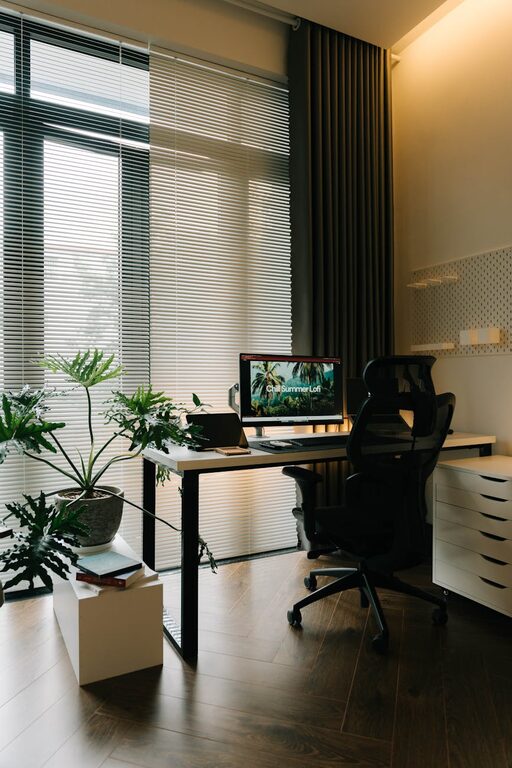
– Positioning your desk near a window for natural light.
– Using a desk lamp with adjustable brightness and direction.
– Avoiding harsh overhead lighting that causes glare.
– Considering warm LED lights, which create a pleasant atmosphere without being too harsh.
6. Keep Technology Organized and Updated
Technology can either streamline or complicate your work:
– Keep cords and chargers neatly arranged using cable ties or organizers.
– Use docking stations or stands for laptops and tablets.
– Regularly clean your devices to maintain performance.
– Ensure software and apps are updated to avoid disruptions.
7. Personalize Your Workspace Wisely
Adding personal touches makes your space inviting but avoid excessive decoration. Ideas include:
– A small plant to bring freshness and reduce stress.
– A calendar or inspirational quotes.
– A favorite mug or a tidy storage basket.
Balance aesthetics with functionality to maintain focus.
8. Develop a Maintenance Routine
Organization is an ongoing process. Set aside a few minutes at the end of each day or week to:
– Clear your desk surface.
– File papers or digital documents.
– Refill supplies.
– Adjust ergonomics if necessary.
A little daily effort prevents buildup of clutter and supports long-term productivity.
Final Thoughts
Organizing your home workspace is a personal process that can significantly improve your daily work experience. By selecting the right location, minimizing clutter, investing in ergonomic comfort, utilizing smart storage, and maintaining good lighting and tech habits, you can create a space that supports both productivity and well-being. Start small with these tips, and gradually tailor your workspace to meet your needs and preferences.
Happy organizing!
Related Posts

Tips for Creating a Cozy and Inviting Home Office Space
Creating a cozy and inviting home office is more important…
Tips for Creating a Relaxing Home Workspace to Boost Productivity
Creating a relaxing home workspace is essential for maintaining focus,…

Tips for Creating a Sustainable Home Garden Year-Round
Creating a sustainable home garden is a fulfilling way to…